
The Ayushman Bharat Health Account (ABHA) Card is a key element in India’s healthcare system, designed to streamline and improve the management of health services. It provides individuals with a unique digital health ID, enabling easy access to their medical records and facilitating efficient healthcare delivery.
Secure access to your ABHA account is crucial for managing your health information and ensuring that healthcare professionals can make well-informed decisions.
Accessing your ABHA card can be done through logging in in using your 14-digit ABHA number and password on the official website or mobile app to view and download your digital health ID card.
Read on to know how you can login through mobile number & ABHA number.
Accessing Your ABHA Account: Login Options:
Choose Your Login Method:
You have two main options to log in to your ABHA account:
- Using your Mobile Number
- Using your ABHA Number
1. Login Using Mobile Number:
- Visit the ABHA website or launch the ABHA mobile app ( you can download it from Google Play Store).
- Select “Login” from the option “”Already have ABHA number? Login”, only if you have created your ABHA number.
- Enter your registered mobile number associated with your ABHA Card.
- A One-Time Password (OTP) will be sent to your mobile number.
- Enter the received OTP in the designated field.
- Click “Login” to access your ABHA account.
2. Login Using ABHA Number:
- Follow steps 1 and 2 from the previous section.
- Instead of entering your mobile number, select the option to login using your ABHA number (14-digit unique identifier).
- Enter your ABHA number in the designated field.
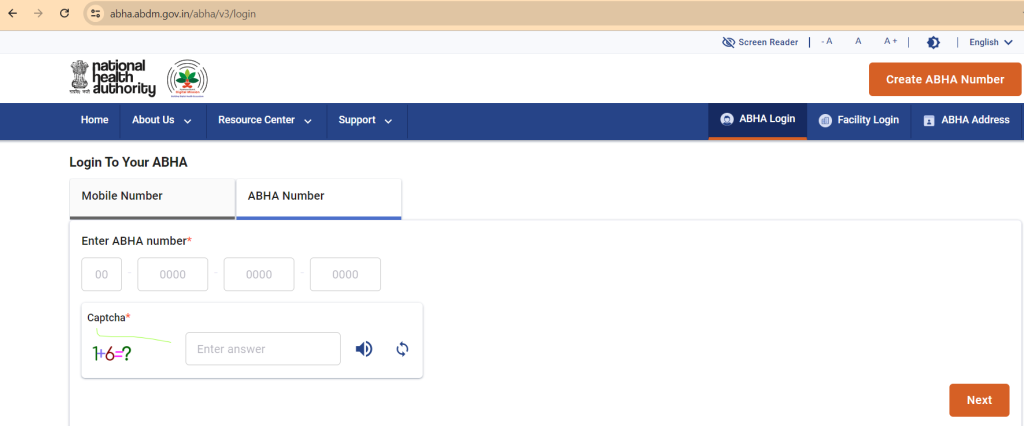
- Complete a CAPTCHA verification (may involve identifying images or letters).
- Click “Login” to access your ABHA account.
Enhancing Login Convenience and Security:
Make it easy to log in: If you’re using the ABHA website, you can create a username & password to log in quickly next time. This is like setting up a shortcut to your account.
Add extra security: You might be able to link your Aadhaar number (your 12-digit ID number) to your ABHA account. This can make your account even safer.
Keep your account safe:
- Strong password: Use a mix of letters, numbers, and symbols for your password to make it hard to guess.
- Don’t share: Never tell anyone your password.
- Be careful: Only use the official ABHA website or app. There are fake ones out there that can steal your information
Overcoming Login Hurdles:
Sometimes things don’t go as planned. Here are some tips if you’re having trouble logging in:
- Forgot your password? Don’t worry, most websites have a “forgot password” option. Just follow the steps to reset it.
- No OTP received? Check your phone number is correct and wait a few minutes. If it still doesn’t arrive, try requesting it again. If that doesn’t work, contact ABHA customer support for help.
Keeping Your ABHA Account Secure:
Your health information is important. Here’s how to protect it:
- Learn more: Visit the official ABHA website or app for detailed information on security practices.
- Report problems: If you see anything suspicious, let ABHA know right away.
By staying informed and being cautious, you can help keep your health information safe.
Conclusion:
Your ABHA account holds important details about your health. By logging in securely, you’re protecting your private information. Choose the login method that works best for you – using your mobile number or ABHA number – and make sure to follow the security tips.
Take control of your health journey by effectively managing your ABHA account.
FAQs:
To create your Digital Health ID:
Start by selecting ‘Create ABHA Number’.
Choose between Aadhaar Number or Driving License.
Click on ‘Next’.
Enter your Aadhaar number or Driving License number.
Agree to the terms and conditions.
Enter the OTP received on your registered mobile number.
Select ‘Submit’ to complete the form submission process.
If you’ve misplaced your ABHA card and need to retrieve your ABHA number, follow these steps:
Visit the Ayushman Bharat Health Account website at abha.abdm.gov.in.
Click on the login option.
Use your registered mobile number to log in.
Navigate to the option for retrieving your ABHA number.
Follow the instructions provided to complete the process and retrieve your ABHA number securely.
The Ayushman Bharat Health Account (ABHA) Health ID offers several benefits, such as easy access to digital health records, effective tracking of medical history, and empowering healthcare professionals to make well-informed decisions.
Having an ABHA health card is not compulsory for receiving medical care. It’s optional to create a health card ID with ABHA, and you can deactivate it whenever you choose to leave the platform.